Page 1 of 1
SOLVED: Second toolbar appearing when it shouldn't? Can anyone help me remove it (Screenshot attached)
Posted: May 1st, 2026, 4:13 pm
by thelinx
Can anyone help me troubleshoot this, please?
This toolbar (red arrow in screenshot) keeps appearing even when no downloads are selected, which it shouldn't.
How do I get rid of it?
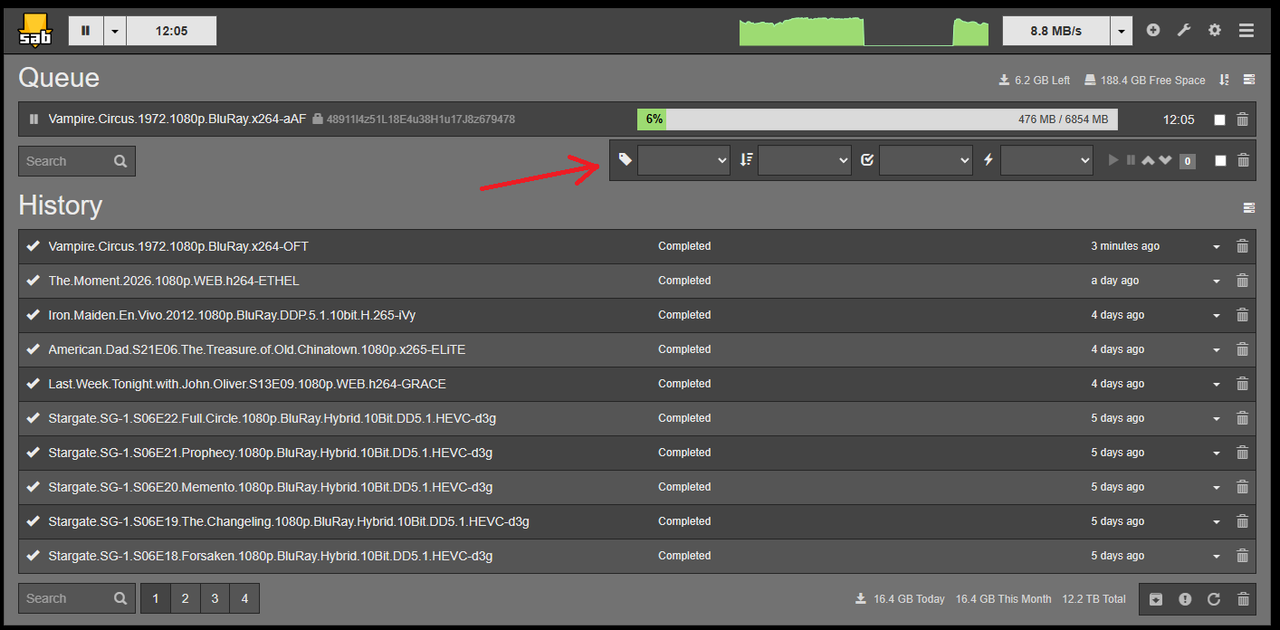
Re: Second toolbar appearing when it shouldn't? Can anyone help me remove it (Screenshot attached)
Posted: May 1st, 2026, 4:48 pm
by OneCD
Hi and welcome to the forum.

What version of SABnzbd is installed please? Which OS?
What is your browser make and version?
Re: Second toolbar appearing when it shouldn't? Can anyone help me remove it (Screenshot attached)
Posted: May 1st, 2026, 7:28 pm
by thelinx
Version: 5.0.1 [c56f974]
OS: Win10
Browser: Google Chrome Version 147.0.7727.138 (Official Build) (64-bit)
Re: Second toolbar appearing when it shouldn't? Can anyone help me remove it (Screenshot attached)
Posted: May 1st, 2026, 7:47 pm
by OneCD
Do you get the same issue in another browser?
Re: Second toolbar appearing when it shouldn't? Can anyone help me remove it (Screenshot attached)
Posted: May 2nd, 2026, 1:25 am
by safihre
It's toggled by the icon in the top right of the queue. It's either on or off, that's why it keeps showing. You must have clicked the icon at some point.
Re: Second toolbar appearing when it shouldn't? Can anyone help me remove it (Screenshot attached)
Posted: May 2nd, 2026, 5:03 pm
by thelinx
safihre wrote: ↑May 2nd, 2026, 1:25 am
It's toggled by the icon in the top right of the queue. It's either on or off, that's why it keeps showing. You must have clicked the icon at some point.
That was it! Thank you!