

Hi everyone
My setup:
- Windows Server 2012 R2
- 8 GB DDR 4 RAM
- Intel Core i7 6700 K (unlocked), 4 Ghz
- Downloadspeed according speedtest.net => 250 mbit/s
- usenet account with max speed 250 mbit/s
- max Connections 20
- running sabnzbd as a service, Version 1.1.0 [8abcf08]
- Article Cache 1 GB
- downloading to SSD, extracting to HDD.
- IPV4, No IPV6
- just Windows Firewall
Before I installed sabnzbd, I runned altBinz on another PC with the same usenet account, and I reached 25-30 Megabyte per seconds (250 mbit/s)
With sabnzbd i barely reach 16 Megabyte per seconds (13-15 MB/s). But my Server reached the complete 250 mbit/s (30 MB/s) on speedtest.net without problems.
Funny side fact: If i disable SSL (TLS) i get 5 MB/s more => 19/20 MB/s.
I think i tried anything (changed firewall rules, set article caches, limited max connection count to 10)
Did anyone have the same problem or could help me in this case?
Download speed should be faster
Forum rules
Help us help you:
Help us help you:
- Are you using the latest stable version of SABnzbd? Downloads page.
- Tell us what system you run SABnzbd on.
- Adhere to the forum rules.
- Do you experience problems during downloading?
Check your connection in Status and Interface settings window.
Use Test Server in Config > Servers.
We will probably ask you to do a test using only basic settings. - Do you experience problems during repair or unpacking?
Enable +Debug logging in the Status and Interface settings window and share the relevant parts of the log here using [ code ] sections.
Download speed should be faster
Last edited by sintho on October 7th, 2016, 3:04 pm, edited 1 time in total.

Re: Download speed should be faster
Thorough report and analysis. Well done.
About SABnzbd: it's written in python (not C), and thus slower than compiled programs written in C
About Python: python is single-core. Can you check the CPU-core/thread load while SAB downloads?
About SSL: yes, that's slower because it requires more CPU (see above)
AFAIK I once reached 32 MB/s with SABnzbd on Linux on my i3 laptop, but with different newsservers. With one newsserver I get lower speeds. I can't repeat that test anymore, because I lowered my FttH's speeds from 500/500 Mbps to 100/100 Mbps.
About SABnzbd: it's written in python (not C), and thus slower than compiled programs written in C
About Python: python is single-core. Can you check the CPU-core/thread load while SAB downloads?
About SSL: yes, that's slower because it requires more CPU (see above)
AFAIK I once reached 32 MB/s with SABnzbd on Linux on my i3 laptop, but with different newsservers. With one newsserver I get lower speeds. I can't repeat that test anymore, because I lowered my FttH's speeds from 500/500 Mbps to 100/100 Mbps.


Re: Download speed should be faster
Try SABnzbd 1.1.1RC1 from the Downloads page, we had a bug in 1.1.0 that might be the cause of this.
If you like our support, check our special newsserver deal or donate at: https://sabnzbd.org/donate
Re: Download speed should be faster
Hi, thank you. I'm a software developer (C#) so i always try hard to give all informations needed 
I've done the investigation as you suggested and found that thread # 7 and 5 are mainly taking part, but also cpu 1, 2 + 3 are a little busy.
I stopped and started the download to be able to differ which process causes which activity.
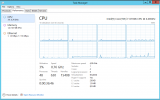
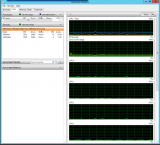
I've done the investigation as you suggested and found that thread # 7 and 5 are mainly taking part, but also cpu 1, 2 + 3 are a little busy.
I stopped and started the download to be able to differ which process causes which activity.
Last edited by sintho on October 7th, 2016, 8:15 am, edited 1 time in total.
Re: Download speed should be faster
Thank you, i will try that and report the results!safihre wrote:Try SABnzbd 1.1.1RC1 from the Downloads page, we had a bug in 1.1.0 that might be the cause of this.
Re: Download speed should be faster
I upgraded to 1.1.1RC1 [0fbf79f] and started sabnzbd again - the download started with 17MB/s and then went down to 15MB/s and stayed there..
So, unfortunately, i think that didn't change anything
So, unfortunately, i think that didn't change anything
Re: Download speed should be faster
Strange.. I would have expected at least 1 CPU to be fully used, but doesn't seem to be the case.
Can you run it (1.1.1RC1) not as a service, but regular? And use max number of connections.
Can you run it (1.1.1RC1) not as a service, but regular? And use max number of connections.
If you like our support, check our special newsserver deal or donate at: https://sabnzbd.org/donate
Re: Download speed should be faster
Hm.. that was a great advice, but with the same result
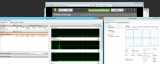
I found another interessting effect. I have plex installed on the same server, plex is based on python too, so I decided to stop plex and watch the speed again.
The speed remained the same. But as i started Plex again, 2 Python processes started, and the speed went from 14.3 to 18 MB/s and then 4 seconds after that, it went down to 14 MB/s again.
Maybe it is a problem of python here..?
*Edit/Remark*
when I turn of SSL, its not 2 MB/s faster, it is actually 5 MB/s. So i get 20 MB/s with no SSL on, 10 more and I would be happy (well, SSL / TLS would be really nice, if there wouldn't be such a difference)
I found another interessting effect. I have plex installed on the same server, plex is based on python too, so I decided to stop plex and watch the speed again.
The speed remained the same. But as i started Plex again, 2 Python processes started, and the speed went from 14.3 to 18 MB/s and then 4 seconds after that, it went down to 14 MB/s again.
Maybe it is a problem of python here..?
*Edit/Remark*
when I turn of SSL, its not 2 MB/s faster, it is actually 5 MB/s. So i get 20 MB/s with no SSL on, 10 more and I would be happy (well, SSL / TLS would be really nice, if there wouldn't be such a difference)
Re: Download speed should be faster
Do you have debug logging turned off?
This system should be capable of much faster speeds.. Especially since CPU usage is not maxing out anything at all..
This system should be capable of much faster speeds.. Especially since CPU usage is not maxing out anything at all..
If you like our support, check our special newsserver deal or donate at: https://sabnzbd.org/donate
Re: Download speed should be faster
Level is on +Info...
Edit:
INFO::[happyeyeballs:138] Quickest IP address for ssl.hoster.com (port 563, ssl True, preferipv6 True) is x.x.x.x.x
From where does this preferipv6 True come from? Maybe this could be a possible slow down?
And this:
CPU Pystone available performance is 38490
isn't that very low for an i7 CPU?
2. Edit:
Hm.. i changed some IP V6 settings, following this article from microsoft:
https://support.microsoft.com/de-ch/kb/929852
Then i restarted the server and now i've got up to 24 MB/s. Still not perfect but way better than before..
Edit:
INFO::[happyeyeballs:138] Quickest IP address for ssl.hoster.com (port 563, ssl True, preferipv6 True) is x.x.x.x.x
From where does this preferipv6 True come from? Maybe this could be a possible slow down?
And this:
CPU Pystone available performance is 38490
isn't that very low for an i7 CPU?
2. Edit:
Hm.. i changed some IP V6 settings, following this article from microsoft:
https://support.microsoft.com/de-ch/kb/929852
Then i restarted the server and now i've got up to 24 MB/s. Still not perfect but way better than before..
Re: Download speed should be faster
Wow.. That made a difference? I am very surprised.
Sander, any idea why?
Sander, any idea why?
If you like our support, check our special newsserver deal or donate at: https://sabnzbd.org/donate
Re: Download speed should be faster
Because the Happy Eyeballs RFC tells to prefer IPv6 in the determination of the quickets IP address. But that can't cause any delay as soon you're downloading.sintho wrote:Level is on +Info...
Edit:
INFO::[happyeyeballs:138] Quickest IP address for ssl.hoster.com (port 563, ssl True, preferipv6 True) is x.x.x.x.x
From where does this preferipv6 True come from? Maybe this could be a possible slow down?
Anyway: If you don't trust that, go to Config -> Switches, and change the setting at "Server load-balancing"
Yes, that's very low ... if you do while SABnzbd is idle. However, if SAB is downloading/working, the available performance will be lower.sintho wrote: And this:
CPU Pystone available performance is 38490
isn't that very low for an i7 CPU?
Re: Download speed should be faster
No, and sintho is secretive about his newsserver and the result found by HappyEyeballs, so I can't check.safihre wrote:Wow.. That made a difference? I am very surprised.
Sander, any idea why?
It seems impossible to me if his newsserver is IPv4 only.
It seems impossible to me if sintho's Internet connection is IPv4 only.
Re: Download speed should be faster
Ok. veeeerry strange...
Now it is 14 MB/s again (tested it one NZB long). It was too early to say, i looked at the rate like 20 seconds or something. Sorry for false positiv.
Firstly I turned IPV6 completely off, then on again (see link above), and then i told windows to prefer ipv4 instead ipv6 and restarted the server.
Immediatly after server-restart the speed seemed to be okay.
Well i changed the logs to debug and this is the output at the start and the rating if im not downloading anything is 46k instead of 38k..
2016-10-07 19:02:15,016::INFO::[happyeyeballs:138] Quickest IP address for ssl.xennews.com (port 563, ssl True, preferipv6 True) is 81.171.118.173
Well, SABNZBD show's me a valid IPV4 as well as an IPV6 adress under 'Status'.
I thought it would be a possible lack of performance, maybe you got another tip for me :-)
Now it is 14 MB/s again (tested it one NZB long). It was too early to say, i looked at the rate like 20 seconds or something. Sorry for false positiv.
Firstly I turned IPV6 completely off, then on again (see link above), and then i told windows to prefer ipv4 instead ipv6 and restarted the server.
Immediatly after server-restart the speed seemed to be okay.
Yes, that's very low ... if you do while SABnzbd is idle. However, if SAB is downloading/working, the available performance will be lower.
Well i changed the logs to debug and this is the output at the start and the rating if im not downloading anything is 46k instead of 38k..
Sorry, thought this would not be really usefull:No, and sintho is secretive about his newsserver and the result found by HappyEyeballs, so I can't check.
It seems impossible to me if his newsserver is IPv4 only.
It seems impossible to me if sintho's Internet connection is IPv4 only.
2016-10-07 19:02:15,016::INFO::[happyeyeballs:138] Quickest IP address for ssl.xennews.com (port 563, ssl True, preferipv6 True) is 81.171.118.173
Well, SABNZBD show's me a valid IPV4 as well as an IPV6 adress under 'Status'.
I thought it would be a possible lack of performance, maybe you got another tip for me :-)
Re: Download speed should be faster
The seemingly high download rate at the beginning of an NZB download is ... fake. It seems SABnzbd marks some files (the par2 files?) as downloaded because that are not needed, causing a higher number of bytes that seem to have been download.
ssl.xennews.com only has IPv4, so IPv6 can't play a role. Unless we've found an architectural problem in the lowest layers of Windows and Python ... which is not very likely.
About your IPv6 address: what are the first two blocks (so, for example: "2001:888:")? That will make clear what kind of IPv6 you have (if any):
fe80: is only on your LAN
2001:0: is Windows' Teredo, not provided by an ISP
other addresseses are more interesting
ssl.xennews.com only has IPv4, so IPv6 can't play a role. Unless we've found an architectural problem in the lowest layers of Windows and Python ... which is not very likely.
About your IPv6 address: what are the first two blocks (so, for example: "2001:888:")? That will make clear what kind of IPv6 you have (if any):
fe80: is only on your LAN
2001:0: is Windows' Teredo, not provided by an ISP
other addresseses are more interesting
Code: Select all
host ssl.xennews.com
ssl.xennews.com is an alias for xennews.svc.highwinds-media.com.
xennews.svc.highwinds-media.com has address 81.171.118.173
xennews.svc.highwinds-media.com has address 81.171.92.194