
freezes, no cpu alot of disk operations

Get help with all aspects of SABnzbd
Forum rules
Help us help you:
  • Are you using the latest stable version of SABnzbd? Downloads page.
  • Tell us what system you run SABnzbd on.
  • Adhere to the forum rules.
  • Do you experience problems during downloading?
    Check your connection in Status and Interface settings window.
    Use Test Server in Config > Servers.
    We will probably ask you to do a test using only basic settings.
  • Do you experience problems during repair or unpacking?
    Enable +Debug logging in the Status and Interface settings window and share the relevant parts of the log here using [ code ] sections.
nzbiswin
Newbie
Newbie
Posts: 11
Joined: May 16th, 2012, 4:53 am

freezes, no cpu alot of disk operations

Post by nzbiswin »

Hi people,

Version: 0.6.1.5
OS: DSM 4.0
Install-type: NAS package
Skin (if applicable): Default
Firewall Software: -
Are you using IPV6? No
Is the issue reproducible? yes

I am encountering the following problem when using SABnzbd:

During the use of it it starts with no problem (using cpu (20%), using ram (50%), using good download speed 8mb/s)), downloading a 400 GB file with SSL.
It starts to decode files (no password protected) and all goes well.

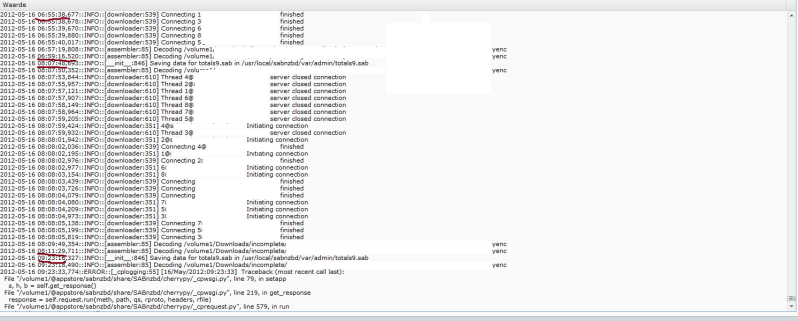
After a whilw it freezes and it starts lose connections. Decoding takes ages and there is no CPU in use. The ram keeps balancing around 50 to 80% and the harddisk makes ALOT of read/write operations. After 20 min - 1 hour it starts downloading again and after a few articles it freezes again. the UI is not accessable (Takes AGES to load). The weird thing is that it does not consume any CPU during the "freezes", but still the application makes ALOT of read/write disk operations.

This process keeps and keeps on repeating itself.

Screenshot of the logging:
Image


If i make a queue with 10 files of 40 GB i encounter 0 problems. In the big nzb there are no articles missing and the nzb is perfect working.

What is the problem?
User avatar
shypike
Administrator
Administrator
Posts: 19773
Joined: January 18th, 2008, 12:49 pm

Re: freezes, no cpu alot of disk operations

Post by shypike »

If you can spare the memory, set a sizeable article cache in Config->General.
128M is a nice value.
Again, only when you have sufficient memory, otherwise swapping will kill performance again.
How much memory does your system have?
nzbiswin
Newbie
Newbie
Posts: 11
Joined: May 16th, 2012, 4:53 am

Re: freezes, no cpu alot of disk operations

Post by nzbiswin »

Currently the article cache is "blank"
this system has 1GB ram.

What does the caching do? (The Articles are around 500 mb each).

In the beginning of the downloading there were no problems. But the more data I downloaded the more laggy it became. Now it even takes almost 1 hour to decode 1 article (of that 400GB file), while the CPU is doing nothing, and the amount of ram used is around 50% - 70% with python consuming almost 50%.

Should i lower connection count aswell? I'am using 8 connections.
User avatar
shypike
Administrator
Administrator
Posts: 19773
Joined: January 18th, 2008, 12:49 pm

Re: freezes, no cpu alot of disk operations

Post by shypike »

Articles are not 500M, but a lot smaller.
Each downloaded file (usually a RAR segment) consists of multiple articles.
Without caching each article is written to disk.
When all articles of a RAR segment file are in, the articles are read from disk and
written in the correct order to the RAR segment file.
Using a cache, SABnzbd will keep as many articles as possible in memory,
ideally enough to collect all articles in memory until they can be written to a RAR segment file.
This saves a lot of disk access.
The average RAR segment file is between 50M and 100M.
So having about 128M if cache will avoid any dumping of articles to disk.
nzbiswin
Newbie
Newbie
Posts: 11
Joined: May 16th, 2012, 4:53 am

Re: freezes, no cpu alot of disk operations

Post by nzbiswin »

shypike wrote:Articles are not 500M, but a lot smaller.
Each downloaded file (usually a RAR segment) consists of multiple articles.
Without caching each article is written to disk.
When all articles of a RAR segment file are in, the articles are read from disk and
written in the correct order to the RAR segment file.
Using a cache, SABnzbd will keep as many articles as possible in memory,
ideally enough to collect all articles in memory until they can be written to a RAR segment file.
This saves a lot of disk access.
The average RAR segment file is between 50M and 100M.
So having about 128M if cache will avoid any dumping of articles to disk.
Thanks for the fast response :)

I see it now. Each .rar file / part is 500mb. So is 128mb enough for that?

Should I also reduce the amount of connections?

I can't access the UI now since it's lagging again. But I will change the settings when it starts downloading again (thats the time when the program unfreezes).

Do you also know why this happends with large files and not with files of like 40GB?
User avatar
shypike
Administrator
Administrator
Posts: 19773
Joined: January 18th, 2008, 12:49 pm

Re: freezes, no cpu alot of disk operations

Post by shypike »

nzbiswin wrote: I see it now. Each .rar file / part is 500mb. So is 128mb enough for that?
No, but such large segments aren't very common.
Maybe if you do BluRays all the time :)
Large posts need more internal memory, but that should not be an issue on your system.
You can overdo it with connections, each provider has its own optimum.
Usually something like 15 is OK. Try to find the lowest setting that doesn't
degrade the download speed.
Also, don't use the "Classic" skin for anything large.
"Smpl" is the fastest skin, "Plush" is the most convenient.
nzbiswin
Newbie
Newbie
Posts: 11
Joined: May 16th, 2012, 4:53 am

Re: freezes, no cpu alot of disk operations

Post by nzbiswin »

I followed your advice. And it did not fix the problem.

It starts downloading a part. Then it starts to decode it. And at the moment it starts to decode. CPU drops to 0, loads of disk operations and ram is still the same. I also don't understand why SABnzbd consumes so much of the ram?
User avatar
shypike
Administrator
Administrator
Posts: 19773
Joined: January 18th, 2008, 12:49 pm

Re: freezes, no cpu alot of disk operations

Post by shypike »

Given that what you describe is very atypical and may be caused
by a combination of circumstances, I can only say that
currently I have no idea about what's going on.
What you describe about your system setup all makes sense.
Enough RAM, no outrageous queue sizes, decent amount of connections.
Other than SABnzbd bugs, I might suspect the file system (long shot)
or your router (also rather unlikely).
What happens if you add a smaller NZB and put that at the top of the queue.
Does this NZB download properly?
nzbiswin
Newbie
Newbie
Posts: 11
Joined: May 16th, 2012, 4:53 am

Re: freezes, no cpu alot of disk operations

Post by nzbiswin »

My router is not the problem, i am 100% sure of it.

The problem doesn't occur with smaller files.
It starts with files above 150GB . In the beginning of the download, all is perfect. But the more data I collect. The slower it becomes. I think it's actually a bug in SABnzbd
User avatar
shypike
Administrator
Administrator
Posts: 19773
Joined: January 18th, 2008, 12:49 pm

Re: freezes, no cpu alot of disk operations

Post by shypike »

nzbiswin wrote: I think it's actually a bug in SABnzbd
I'm not saying it isn't. Only that it's entirely atypical
and therefor just about impossible to diagnose,
especially on someone else's NAS.
Not using cache will normally result in lower performance,
but in a rather deterministic way.
One last thing you could try is to set the cache to -1,
which is unlimited.
It is possible that this will result in swapping in downloads that contain
very large rar segment files.
You could try release 0.7.0Beta5 which does some queue handling different.
You'd have to install that manually using our tar.gz distribution file.
Your previous package should already take care of all prerequisites.
nzbiswin
Newbie
Newbie
Posts: 11
Joined: May 16th, 2012, 4:53 am

Re: freezes, no cpu alot of disk operations

Post by nzbiswin »

shypike wrote:
nzbiswin wrote: I think it's actually a bug in SABnzbd
I'm not saying it isn't. Only that it's entirely atypical
and therefor just about impossible to diagnose,
especially on someone else's NAS.
Not using cache will normally result in lower performance,
but in a rather deterministic way.
One last thing you could try is to set the cache to -1,
which is unlimited.
It is possible that this will result in swapping in downloads that contain
very large rar segment files.
You could try release 0.7.0Beta5 which does some queue handling different.
You'd have to install that manually using our tar.gz distribution file.
Your previous package should already take care of all prerequisites.
Cache -1 didnt work out. Exactly same results. Reinstalling SAB didnt work out either.
Well maybe no one else noticed yet, since downloading files of 150GB or more (hell even 400GB) isn't common.

Is there a way to determine what SABnzb is actually doing at the moment? Because i think the problem lies in the decoding or trying to establish a new connection (which fails).
User avatar
shypike
Administrator
Administrator
Posts: 19773
Joined: January 18th, 2008, 12:49 pm

Re: freezes, no cpu alot of disk operations

Post by shypike »

nzbiswin wrote:Is there a way to determine what SABnzb is actually doing at the moment?
Not really, not without a debugger and there aren't any usable ones for embedded systems.
BTW: which Usenet provider do you have?
nzbiswin
Newbie
Newbie
Posts: 11
Joined: May 16th, 2012, 4:53 am

Re: freezes, no cpu alot of disk operations

Post by nzbiswin »

eweka
User avatar
shypike
Administrator
Administrator
Posts: 19773
Joined: January 18th, 2008, 12:49 pm

Re: freezes, no cpu alot of disk operations

Post by shypike »

Run-of-the-mill provider, that's not a factor.
nzbiswin
Newbie
Newbie
Posts: 11
Joined: May 16th, 2012, 4:53 am

Re: freezes, no cpu alot of disk operations

Post by nzbiswin »

I really start to believe its a connection/memory bug in SABnzbd.
I tried a different nzb with the same quantity (400GB) and after a while (200-300GB) it starts showing the same problems. almost no cpu cyclus, no downloading, alot of disk operations and normal ram use and webui not accessable.

i think no one noticed before, since people barely download of such huge quantities
Post Reply