Support for the Debian/Ubuntu package, created by JCFP.
Forum rules
Help us help you:
Are you using the latest stable version of SABnzbd? Downloads page .
Tell us what system you run SABnzbd on.
Adhere to the forum rules .
Do you experience problems during downloading? Status and Interface settings window. Test Server in Config > Servers . basic settings .Do you experience problems during repair or unpacking? +Debug logging in the Status and Interface settings window and share the relevant parts of the log here using [ code ] sections.
Badmuts
Newbie
Posts: 16 Joined: April 26th, 2012, 9:44 am
Post
by Badmuts April 26th, 2012, 9:56 am
Hello Guys,
First of all I want to let you know I am a big fan of the sabnzbd project.
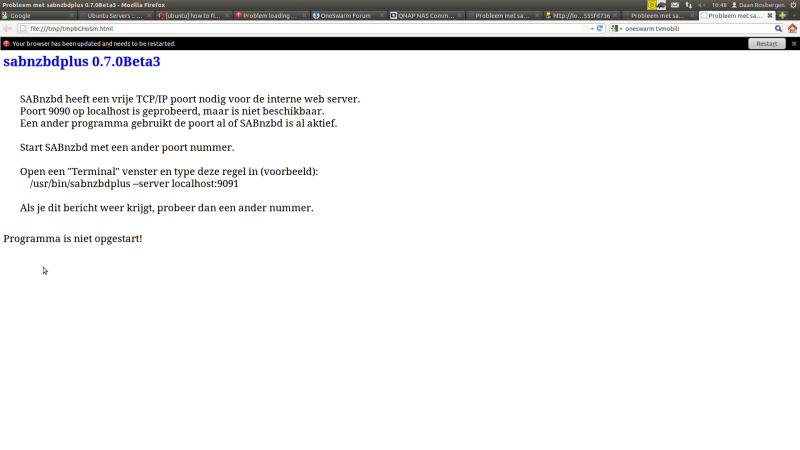
So this is my problem. After using sabnzbd for about 2 months stable on my ubuntu server pc I decided to update my sabnzbd to 0.7.0 Beta 3. After the update I couldn't acces sabnzbdplus anymore. I got the following error:
I tried the solution sabnzbdplus gave me, to run the command in a terminal. It worked but I couldn't acces it from another pc anymore. Also after about 2 hours sabnzbdplus stopped working. I tried rebooting and start and stopping the service but this also doesn't work even reinstalling didn't work. Also netstat told me port 8080 is not in use.
I'm what you say a n00b in Linux so I don't really know how to solve the problem.
I hope the problem is clear enough although my English is not very well.
sander
Release Testers
Posts: 9429 Joined: January 22nd, 2008, 2:22 pm
Post
by sander April 26th, 2012, 10:35 am
What's the output of:
Code: Select all
sudo netstat -apon | grep -i listen | grep -vi listening
sudo netstat -apon | grep -i listen | grep -vi listening | grep -i python
This is my output of the second command:
Code: Select all
sander@R540:~$ sudo netstat -apon | grep -i listen | grep -vi listening | grep -i python
tcp6       0      0 :::8080                 :::*                    LISTEN      3435/python      off (0.00/0/0)
tcp6       0      0 :::9090                 :::*                    LISTEN      3435/python      off (0.00/0/0)
sander@R540:~$
Badmuts
Newbie
Posts: 16 Joined: April 26th, 2012, 9:44 am
Post
by Badmuts April 26th, 2012, 10:42 am
First command:
Code: Select all
tcp        0      0 0.0.0.0:9091            0.0.0.0:*               LISTEN      1889/transmission-d off (0.00/0/0)
tcp        0      0 127.0.0.1:904           0.0.0.0:*               LISTEN      4175/python      off (0.00/0/0)
tcp        0      0 0.0.0.0:30888           0.0.0.0:*               LISTEN      4054/tvmobilisvcd off (0.00/0/0)
tcp        0      0 0.0.0.0:5000            0.0.0.0:*               LISTEN      1727/python      off (0.00/0/0)
tcp        0      0 127.0.0.1:905           0.0.0.0:*               LISTEN      4175/python      off (0.00/0/0)
tcp        0      0 192.168.178.41:5001     0.0.0.0:*               LISTEN      1543/java        off (0.00/0/0)
tcp        0      0 127.0.0.1:3306          0.0.0.0:*               LISTEN      7735/mysqld      off (0.00/0/0)
tcp        0      0 127.0.0.1:906           0.0.0.0:*               LISTEN      4175/python      off (0.00/0/0)
tcp        0      0 127.0.0.1:907           0.0.0.0:*               LISTEN      4175/python      off (0.00/0/0)
tcp        0      0 127.0.0.1:587           0.0.0.0:*               LISTEN      3896/sendmail: MTA: off (0.00/0/0)
tcp        0      0 127.0.1.1:44331         0.0.0.0:*               LISTEN      1559/java        off (0.00/0/0)
tcp        0      0 127.0.0.1:908           0.0.0.0:*               LISTEN      4175/python      off (0.00/0/0)
tcp        0      0 0.0.0.0:5900            0.0.0.0:*               LISTEN      1537/vino-server off (0.00/0/0)
tcp        0      0 127.0.1.1:44332         0.0.0.0:*               LISTEN      1555/java        off (0.00/0/0)
tcp        0      0 127.0.0.1:909           0.0.0.0:*               LISTEN      4175/python      off (0.00/0/0)
tcp        0      0 192.168.178.41:943      0.0.0.0:*               LISTEN      4175/python      off (0.00/0/0)
tcp        0      0 0.0.0.0:10000           0.0.0.0:*               LISTEN      1681/perl        off (0.00/0/0)
tcp        0      0 0.0.0.0:8081            0.0.0.0:*               LISTEN      1856/python      off (0.00/0/0)
tcp        0      0 192.168.178.41:914      0.0.0.0:*               LISTEN      4275/openvpn     off (0.00/0/0)
tcp        0      0 192.168.178.41:915      0.0.0.0:*               LISTEN      4285/openvpn     off (0.00/0/0)
tcp        0      0 0.0.0.0:51413           0.0.0.0:*               LISTEN      1889/transmission-d off (0.00/0/0)
tcp        0      0 0.0.0.0:8181            0.0.0.0:*               LISTEN      1800/python      off (0.00/0/0)
tcp        0      0 0.0.0.0:21              0.0.0.0:*               LISTEN      1606/vsftpd      off (0.00/0/0)
tcp        0      0 0.0.0.0:22              0.0.0.0:*               LISTEN      838/sshd         off (0.00/0/0)
tcp        0      0 127.0.0.1:631           0.0.0.0:*               LISTEN      881/cupsd        off (0.00/0/0)
tcp        0      0 127.0.0.1:25            0.0.0.0:*               LISTEN      3896/sendmail: MTA: off (0.00/0/0)
tcp        0      0 0.0.0.0:443             0.0.0.0:*               LISTEN      1903/webcit      off (0.00/0/0)
tcp        0      0 0.0.0.0:1723            0.0.0.0:*               LISTEN      1878/pptpd       off (0.00/0/0)
tcp        0      0 0.0.0.0:8895            0.0.0.0:*               LISTEN      1559/java        off (0.00/0/0)
tcp        0      0 0.0.0.0:23423           0.0.0.0:*               LISTEN      1559/java        off (0.00/0/0)
tcp6       0      0 :::5800                 :::*                    LISTEN      1537/vino-server off (0.00/0/0)
tcp6       0      0 :::139                  :::*                    LISTEN      812/smbd         off (0.00/0/0)
tcp6       0      0 :::5900                 :::*                    LISTEN      1537/vino-server off (0.00/0/0)
tcp6       0      0 :::80                   :::*                    LISTEN      1038/apache2     off (0.00/0/0)
tcp6       0      0 :::51413                :::*                    LISTEN      1889/transmission-d off (0.00/0/0)
tcp6       0      0 :::22                   :::*                    LISTEN      838/sshd         off (0.00/0/0)
tcp6       0      0 ::1:631                 :::*                    LISTEN      881/cupsd        off (0.00/0/0)
tcp6       0      0 :::445                  :::*                    LISTEN      812/smbd         off (0.00/0/0)
Second command:
Code: Select all
tcp        0      0 127.0.0.1:904           0.0.0.0:*               LISTEN      4175/python      off (0.00/0/0)
tcp        0      0 0.0.0.0:5000            0.0.0.0:*               LISTEN      1727/python      off (0.00/0/0)
tcp        0      0 127.0.0.1:905           0.0.0.0:*               LISTEN      4175/python      off (0.00/0/0)
tcp        0      0 127.0.0.1:906           0.0.0.0:*               LISTEN      4175/python      off (0.00/0/0)
tcp        0      0 127.0.0.1:907           0.0.0.0:*               LISTEN      4175/python      off (0.00/0/0)
tcp        0      0 127.0.0.1:908           0.0.0.0:*               LISTEN      4175/python      off (0.00/0/0)
tcp        0      0 127.0.0.1:909           0.0.0.0:*               LISTEN      4175/python      off (0.00/0/0)
tcp        0      0 192.168.178.41:943      0.0.0.0:*               LISTEN      4175/python      off (0.00/0/0)
tcp        0      0 0.0.0.0:8081            0.0.0.0:*               LISTEN      1856/python      off (0.00/0/0)
tcp        0      0 0.0.0.0:8181            0.0.0.0:*               LISTEN      1800/python      off (0.00/0/0)
sander
Release Testers
Posts: 9429 Joined: January 22nd, 2008, 2:22 pm
Post
by sander April 26th, 2012, 10:59 am
And the output of
Here's mine:
Code: Select all
sander@R540:~$ ps -ef | grep -i sabnzbd
sander    3435  3378  3 17:33 pts/5    00:00:49 /usr/bin/python -OO ./SABnzbd.py
sander    3674  3315  0 17:58 pts/4    00:00:00 grep --color=auto -i sabnzbd
sander@R540:~$
Badmuts
Newbie
Posts: 16 Joined: April 26th, 2012, 9:44 am
Post
by Badmuts April 26th, 2012, 11:05 am
Code: Select all
daan 13728 2637 0 18:04 pts/4 00:00:00 grep --color=auto -i sabnzbd
sander
Release Testers
Posts: 9429 Joined: January 22nd, 2008, 2:22 pm
Post
by sander April 26th, 2012, 11:51 am
That's all output? If so, there is indeed no SABnzbd running.
I would do this: move / rename sabnzbd.ini. This is how:
Code: Select all
sander@toverdoos:~$ cd
sander@toverdoos:~$ cd .sabnzbd/
sander@toverdoos:~/.sabnzbd$ mv sabnzbd.ini sabnzbd.ini.oud
sander@toverdoos:~/.sabnzbd$
The start SABnzbd. It should start the wizard. Fill it out.
Then it should work again.
Badmuts
Newbie
Posts: 16 Joined: April 26th, 2012, 9:44 am
Post
by Badmuts April 26th, 2012, 11:57 am
I completed the wizard and then got the same problem again
sander
Release Testers
Posts: 9429 Joined: January 22nd, 2008, 2:22 pm
Post
by sander April 26th, 2012, 2:18 pm
Badmuts wrote: I completed the wizard and then got the same problem again
That's very strange: the wizard itself uses the webinterface too.
In the wizard, did you leave all settings default? So: http on port 8080, no https?
Badmuts
Newbie
Posts: 16 Joined: April 26th, 2012, 9:44 am
Post
by Badmuts April 26th, 2012, 3:02 pm
Yes port 8080. With HTTPS, i will try without HTTPS
Badmuts
Newbie
Posts: 16 Joined: April 26th, 2012, 9:44 am
Post
by Badmuts April 26th, 2012, 4:40 pm
Tried that to, the moment that i change localhost to 0.0.0.0 to make it public SabNZBD crashes and gives me te same error.
Badmuts
Newbie
Posts: 16 Joined: April 26th, 2012, 9:44 am
Post
by Badmuts April 26th, 2012, 4:53 pm
Got it working again with version 0.6.8-1. I could install it via Synaptic Package Manager and use force version.
Thanks for the help, but I think I stay with 0.6.8-1 for a while
Badmuts
Newbie
Posts: 16 Joined: April 26th, 2012, 9:44 am
Post
by Badmuts May 5th, 2012, 6:47 am
Too bad I have to upgrade to the new sabnzb because of newzbin. What could possibly be the problem of all this?
Pleas help, I have no idea
shypike
Administrator
Posts: 19773 Joined: January 18th, 2008, 12:49 pm
Post
by shypike May 5th, 2012, 8:19 am
Try to use the local IP address of your system instead (usually something like 192.168.1.??).
Badmuts
Newbie
Posts: 16 Joined: April 26th, 2012, 9:44 am
Post
by Badmuts May 5th, 2012, 12:48 pm
Didn't help. I also upgradet to Ubuntu 12.04 but this also didn't help
shypike
Administrator
Posts: 19773 Joined: January 18th, 2008, 12:49 pm
Post
by shypike May 5th, 2012, 3:12 pm
What happens if you run SABnzbd from a terminal window?